Tested with: KSA Version 2026.10.19.5638
¶ Game Documents Directory
The Game Documents Directory is the directory the KSA uses to store/load Game Saves, Vehicle Saves, HUD Layouts, logs, crash dumps, settings, the mod manifest, mods, and more. It is normally found at \Documents\My Games\Kitten Space Agency on Windows and a similar directory on Linux.
This page will go over how to accurately access this directory, all the important sub-directories, and why you should access it in this way.
¶ How To Access The Game Documents Directory
To access the Game Documents Directory in KSA, all you need is to access KSA.Constants.DocumentsFolderPath in the KSA.dll.
In the example code below, I am using a StarMapMod to inject my code into KSA.
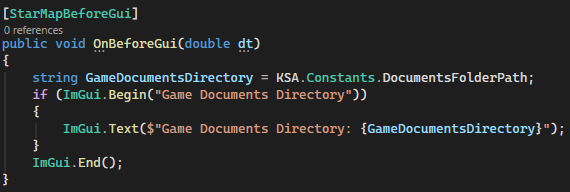
The code produces this as a result.

The string that KSA.Constants.DocumentsFolderPath returns will be a path as seen above.
¶ How To Access The Sub-Directories
The rest of the directories in the Game Documents Directory can be found using a multitude of KSA's functions and properties within the dll.
All the properties and methods below use the KSA.Constants.DocumentsFolderPath to calculate the path.
KSA.Constants.LogsFolderPath-> returns a string with the path to the\logsfolder.KSA.Constants.CrashDumpFolderPath-> returns a string with the path to the\crashdumpsfolder.GameSaves.SaveFolderPath-> returns a string with the path to the\savesfolder.LayoutSaves.SaveFolderPath-> returns a string with the path to the\HUDLayoutsfolder.VehicleSaves.SaveFolderPath-> returns a string with the path to the\vehiclesfolder.ModLibrary.LocalManifestPath-> returns a string with the path to themanifest.tomlfile.ModLibrary.LocalModsFolderPath-> returns a string with the path to the\modsfolder.
The
settings.toml,\imports, and\exportspath creators are still private as of build 2026.8.5.5168.
¶ Why You Should Access The Game Documents Directory This Way
You could say that it is easier to let KSA handle the path creation/finding itself and that would be true, however it doesn't fully encapsulate the most important reason, Instances.
¶ Instances
An Instance for KSA is a specific copy of the \Documents\My Games\Kitten Space Agency folder. Instances are mainly used/created by mod managers or anything that wants to create a seperate copy of saves, settings, logs, etc.
For example, if a user wants to load up a mod pack ModPack A but they want to use different settings and mods from unmodded KSA, they can create an instance at Documents\My Games\ModPack A. Then, they can load KSA using this instance folder for settings, gamesaves, mods, and more.
As of 7/30/2026, Instancing support for StarMap, which expands to KSA, is under review for the next StarMap release.
If you hardcoded the path, or used a different way to find the path, to the Game Documents Directory, your mod would be reading/writing to the wrong location.
¶ Why KSA.Constants.DocumentsFolderPath Works
The next question you might have is why should I then use KSA.Constants.DocumentsFolderPath?
The reason you should use KSA.Constants.DocumentsFolderPath is because when a new instance's directory is given to StarMap/KSA, it overwrites KSA.Constants.DocumentsFolderPath to output the instance's provided path. This ensures StarMap, KSA, and any mods using KSA.Constants.DocumentsFolderPath and the derived functions/properties will read/write to the correct location; in the instance, not the unmodded KSA documents folder.
¶ Example With Instancing
Below is an example of the code displayed at the top of the page working with an instance called "test".

As you can see, the same KSA.Constants.DocumentsFolderPath now returns the instance's path rather than Documents\My Games\Kitten Space Agency.
¶ TL:DR
Use KSA.Constants.DocumentsFolderPath and derivate KSA functions/properties to access saves, vehicles, mods, settings, and more. This will allow your mods to work with instancing.