Tested with: KSA Version 2026.10.19.5638
¶ Logs and Debugging
¶ Finding Log Files
KSA stores its log files in your Documents folder:
Location: Documents\My Games\Kitten Space Agency\logs\
The live log is KittenSpaceAgency.log, written as you play.
Older sessions are rotated into logs\Archives\ and renamed on the way, as Brutal.YYMMDD.N.log. For example Brutal.260523.0.log is 23 May 2026, first run of that day. The trailing number is a same-day counter, not an hour.
Crash dumps land in crashdumps\, a sibling of logs\.
Note the folder is lowercase logs. That does not matter on Windows, it will on Linux.
In a mod, get the path from
KSA.Constants.LogsFolderPathrather than building it yourself, so your mod keeps working under a mod manager that uses a separate instance folder. See Game Documents Directory.
¶ Reading Log Files
Open KittenSpaceAgency.log in any text editor (Notepad, VS Code, etc.) to view the log.
The log file contains useful information for debugging:
- Loading errors: Look for lines containing "ERROR" or "Exception"
- Asset loading: Search for your mesh/texture filenames to see if they loaded successfully
- XML parsing errors: Check for "XML" or "Parse" related errors
- Instantiation issues: Look for "instantiated" or "Vehicle" mentions
¶ Common Error Patterns
¶ NullReferenceException in SubPartModel
Error: NullReferenceException at SubPartModel..ctor
Cause: Missing texture files (Normal or RoughMetalAo)
Solution: Ensure all three texture types (Diffuse, Normal, AoRoughMetal) are specified in your PbrMaterial definition
¶ Model Not Loading
Search log for: Your mesh filename (e.g., "your_model.glb")
If not found: Check the Path on your <MeshFile> or <MeshAtlas> matches the actual filename, and that the file defining it is listed under assets in your mod.toml
If found with errors: Check the GLB file format and vertex attributes
¶ XML Parse Errors
Error: Lines mentioning XML parsing or schema validation
Cause: Syntax error in XML files (missing closing tags, invalid attributes)
Solution: Validate your XML syntax - common issues:
- Missing closing tags
</Part>,</SubPart>, etc. - Misspelled attribute names
- Unclosed quotes in attribute values
¶ Debugging
Debugging your mod can be done by following these steps:
¶ For Visual Studio:
-
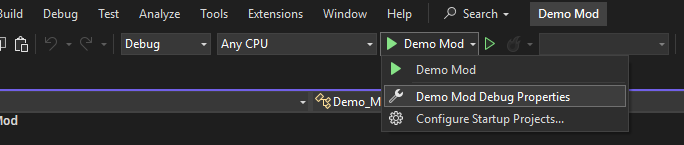
Open Debug Properties:
-
Create a new Executable Launch Profile and make it point to the StarMap.exe executable file (don't forget to set the working directory to the StarMap folder)
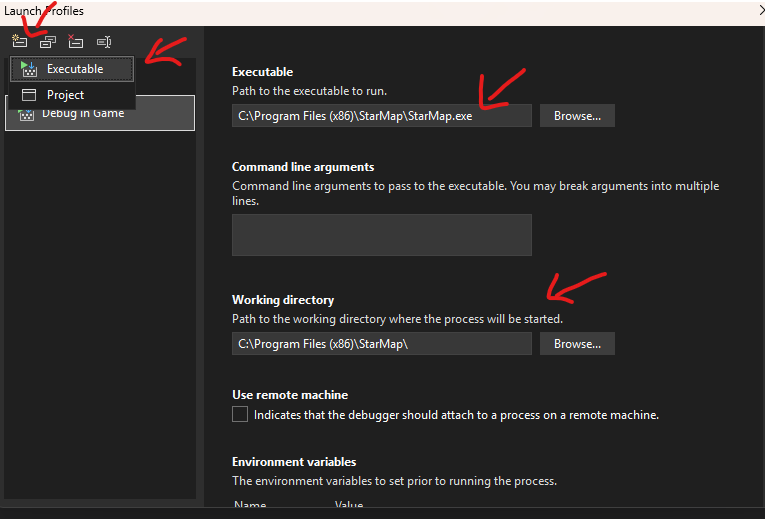
And that's it! You can now set breakpoints in your mod code and run StarMap from Visual Studio to debug your mod.
¶ For JetBrains Rider:
-
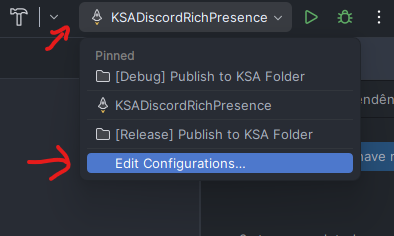
Open the Run/Debug Configurations dialog:
-
Create a new Executable Launch Configuration and make it point to the StarMap.exe executable file (don't forget to set the working directory to the StarMap folder)
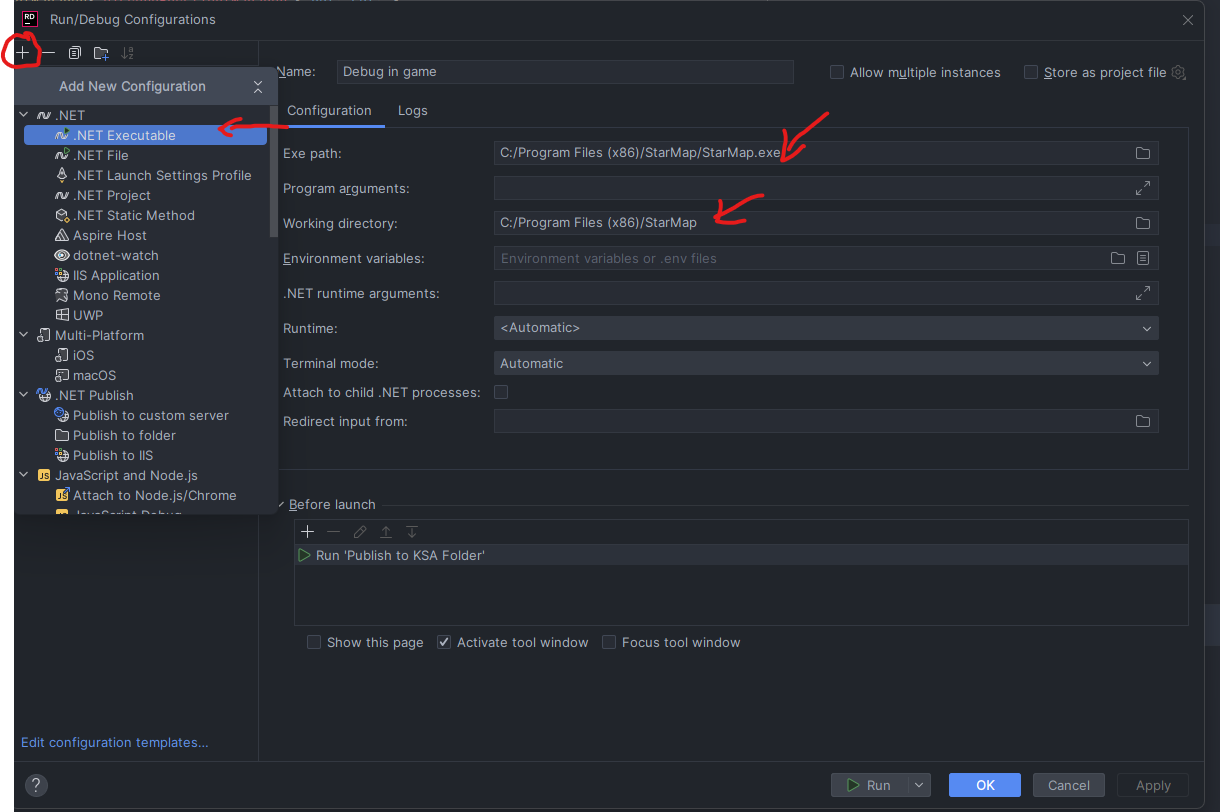
You can now set breakpoints in your mod code and run StarMap from Rider to start debugging
¶ Pro tip
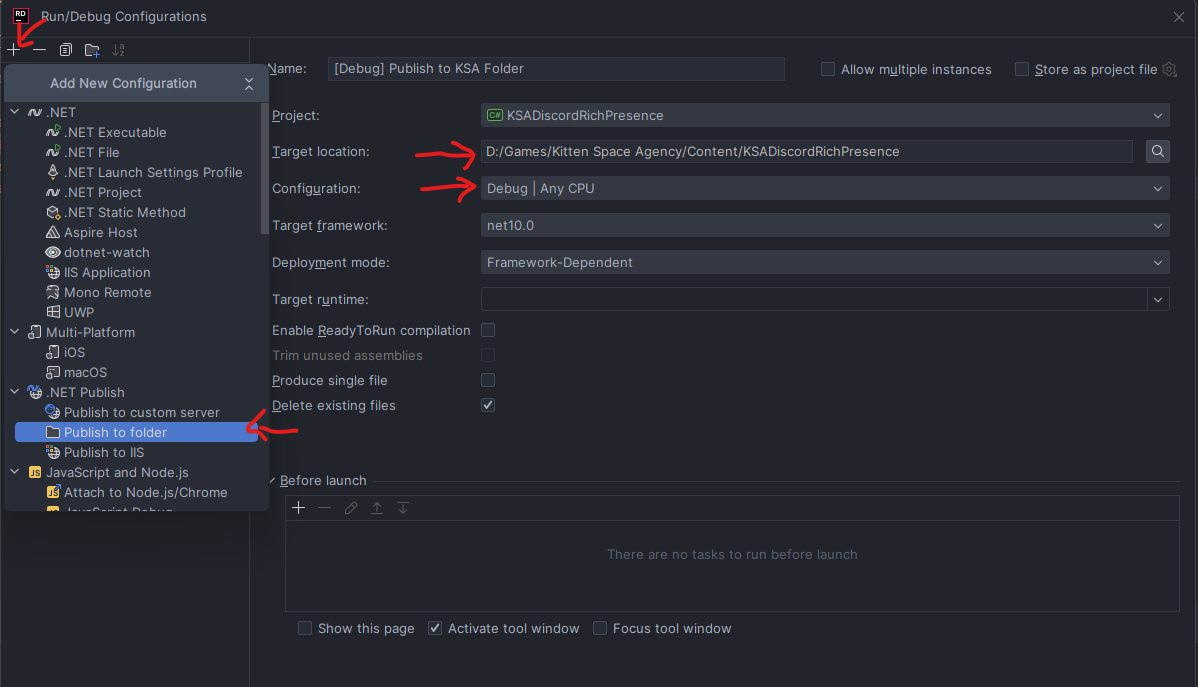
In Rider you can setup a task that will output your binaries in the Content folder of your KSA installation automatically and then you can make this task run before launching the game, so whenever you hit debug, your latest code changes will be deployed to the mods folder.